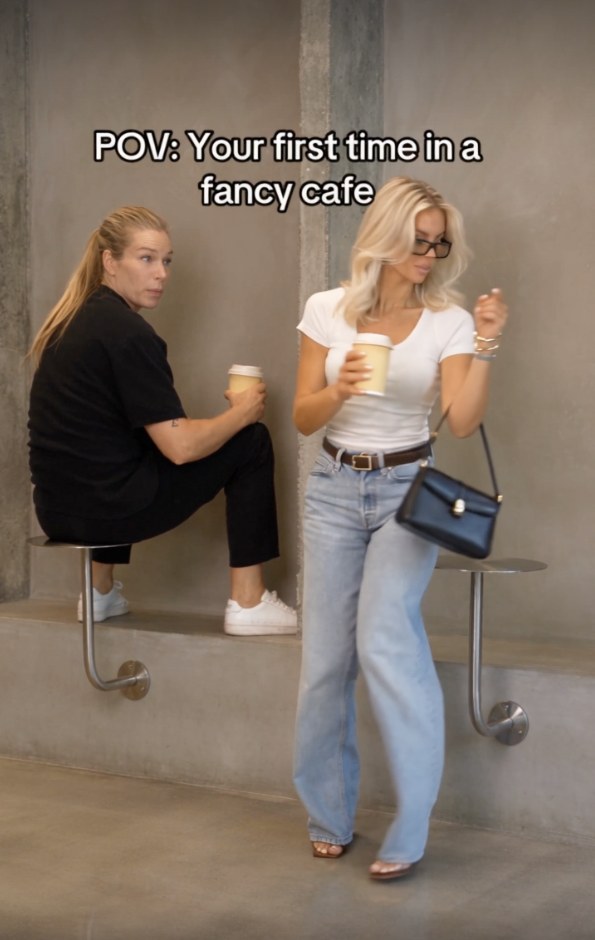
This is exactly how I put myself into that fancy cafe video. I didn't film anything. I took the original clip, made an AI character of myself and let the AI swap the people, while every move, the timing and the room stayed the same.
⏱ About 20 minutes🎬 Higgsfield Genjutsu🖼 GPT Image 2.5
me, never actually there
Before you start
What you need
A short clipThe clip you want to recreate, 4 to 30 seconds. Remember to credit the creator you borrowed it from.
A few photos of youFront, side and full body, to build your character sheet.
GPT Image 2.5Or any image tool you like, for the character sheet and the second person.
HiggsfieldI used Genjutsu with Objects swap. Get Higgsfield
Step 1
Make a character sheet of yourself
This is the step that made the biggest difference for me. With a single photo, the AI tends to make me look older and more wrinkled than I am. So I first make a character sheet in GPT Image 2.5 from real photos of myself: front, side, full body and a few expressions.
It still looks like me, just cleaner, and the video model gets every angle it needs.
Upload 4 to 6 stills of yourself (frames from a video you filmed work great, ideally from different angles) and send this:
Character sheet promptCreate a character sheet of me from these stills. They're frames from a video I filmed, so this is me.
Make it look as much like me as possible: same face, eyes, nose, smile, hair and features. Keep my real age. Don't make me look older and don't add extra wrinkles. I want to look good, but still like myself.
Remove anything I'm holding, like a microphone.
Include: one large close-up portrait, my head from the front, three-quarter and side, a few different expressions, my full body from the front, side and back, and close-ups of my eye, skin, lips and ear. Same outfit and the same soft lighting in every image.
Step 2
Create the second person
If there's someone else in the clip, don't use a real stranger. Create an invented person instead. Ask for a candid phone photo, not a model shot, so they look like a real person.
Give them a look and colors that are clearly different from yours, so the AI doesn't mix your faces.
Go to Video, open Genjutsu and choose Objects swap, not Motion transfer.
Upload your clip under Add a reference video
Upload your character sheet first, then the second person
Turn on Prompt and paste the prompt below
Step 4
Paste the prompt
Fill in the [brackets] with your own details. In Higgsfield, type @ and pick Video 1, Image 1 and Image 2 from the list, so the tags link to your uploads. If that doesn't work, write "the video", "image 1" and "image 2" instead.
The swap promptUse @Video1 as the base and change nothing except who is in it. The camera, the room, the lighting, every movement and the exact timing stay as they are. Leave any text on screen untouched.
Person 1 ([who you replace, e.g. the man on the table]) is now me from @Image1. Match my face and hair exactly: [your hair]. Body: [your real build, e.g. athletic and feminine, toned arms, narrow shoulders, slim waist, strong legs]. Posture: back straight and upright, shoulders down and relaxed, never hunched. Outfit: [your outfit]. Follow the original movements: [one-line summary of the action]. Look [where they look] and never at the camera. Expression: [expression]. Two arms, two legs and two feet at all times.
Person 2 ([the other person in the clip]) is now the person from @Image2, with the same face, [their hair and outfit]. Follow that person's original movements. Make the two people look clearly different from each other.
Keep it photorealistic: natural skin with the same texture as @Image1, no extra wrinkles and no added age, fabric that moves naturally, normal speed. Only these two people in the frame. Don't add any text, logos or watermarks.
Step 5
Test, then finish
Run one test first and check it closely before you spend more credits. Then add your own text and music on top in your favorite editor.
What I learned
My tips
1
Don't describe every move. The AI can already see the video. A short summary of the action works better.
2
Write your real body. If you don't, you end up with the original person's body. Posture matters too: I had to add "upright back, never hunched".
3
Different colors for different people. Two people in the same color look too alike.
4
Watch the clothes. Long coats and blazers tend to glide through furniture, and that's what gives the AI away.
5
Make it yours. Change the outfits, the people and the text, and credit the original creator of the clip.
Have fun! If you make one, tag me @shedoesai ♡
Want to edit every reel with Claude?
The Claude Editing Challenge: 7 days from idea to finished reel.